
SaaS Security Checklist: 15 Essential Security Controls
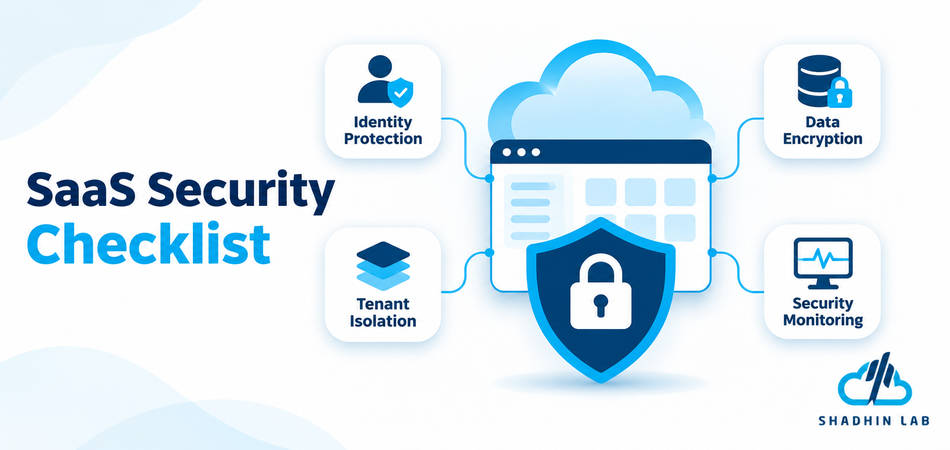
Table of Contents
A SaaS company may store customer information, process requests through shared infrastructure, and connect multiple services through APIs. A weakness in authentication, tenant isolation, or data handling can expose information beyond the account or system where the problem originated. Protecting a SaaS product therefore requires more than securing its login page or hosting environment.
This SaaS security checklist covers 15 essential controls across application architecture, infrastructure, identities, data protection, and operations to help teams identify weaknesses and build a more reliable security program.
Table of Contents
Key Takeaways
- SaaS security requires controls across applications, infrastructure, identities, data, and operations.
- Multi-tenant applications need enforceable boundaries between customer environments.
- Strong authentication, authorization, and least-privilege access reduce unauthorized access risks.
- Secure development, vulnerability management, and continuous monitoring help identify weaknesses.
- Backups, incident response, and recovery planning support operational resilience.
- Security controls should evolve as the SaaS product, customer base, and threat landscape change.
Why Is SaaS Security Important?
SaaS applications handle customer data and business processes through connected environments. Users access them from different devices and locations, employees manage administrative functions, and integrations exchange information with external services. The application may also rely on cloud infrastructure, databases, storage services, and third-party software.
Each connection introduces security responsibilities. A compromised administrator account could expose sensitive customer information. An authorization flaw might allow one customer to access another customer’s records. A misconfigured storage service could make data publicly accessible, while an insecure API could expose business functions that are not available through the main application interface.
Common SaaS Security Challenges
Three characteristics make SaaS security particularly important.
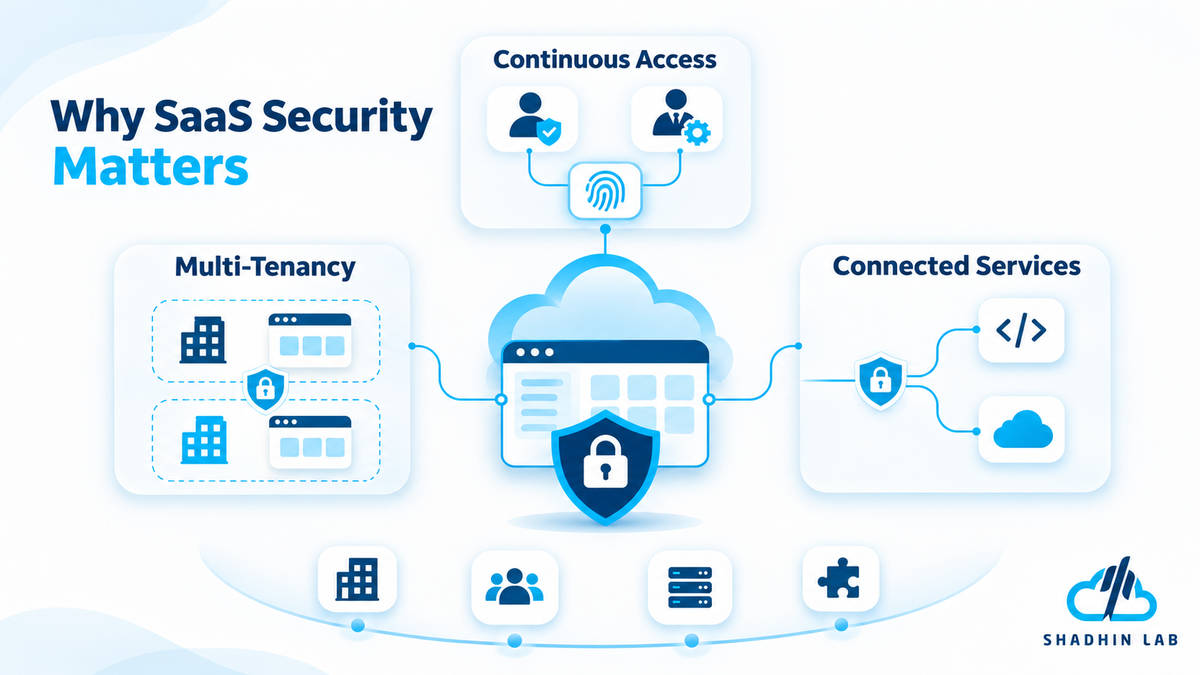
- Multi-tenancy: Multiple customers may use the same application infrastructure, databases, or other resources. The architecture must enforce boundaries so one customer’s users cannot access another customer’s information.
- Continuous access: Customers, employees, administrators, automated workloads, and integrations interact with the platform from different environments. Access must be authenticated, authorized, and monitored appropriately.
- Connected services: SaaS applications depend on cloud providers, identity services, external APIs, monitoring tools, development platforms, and software dependencies. A weakness in one connected component can affect the wider environment.
The OWASP Multi-Tenant Security Cheat Sheet highlights risks such as cross-tenant data leakage, broken isolation, insecure storage, and tenant-aware logging. These concerns make SaaS security an architectural and operational responsibility, not simply a collection of login protections.
SaaS Security Checklist: 15 Essential Security Controls
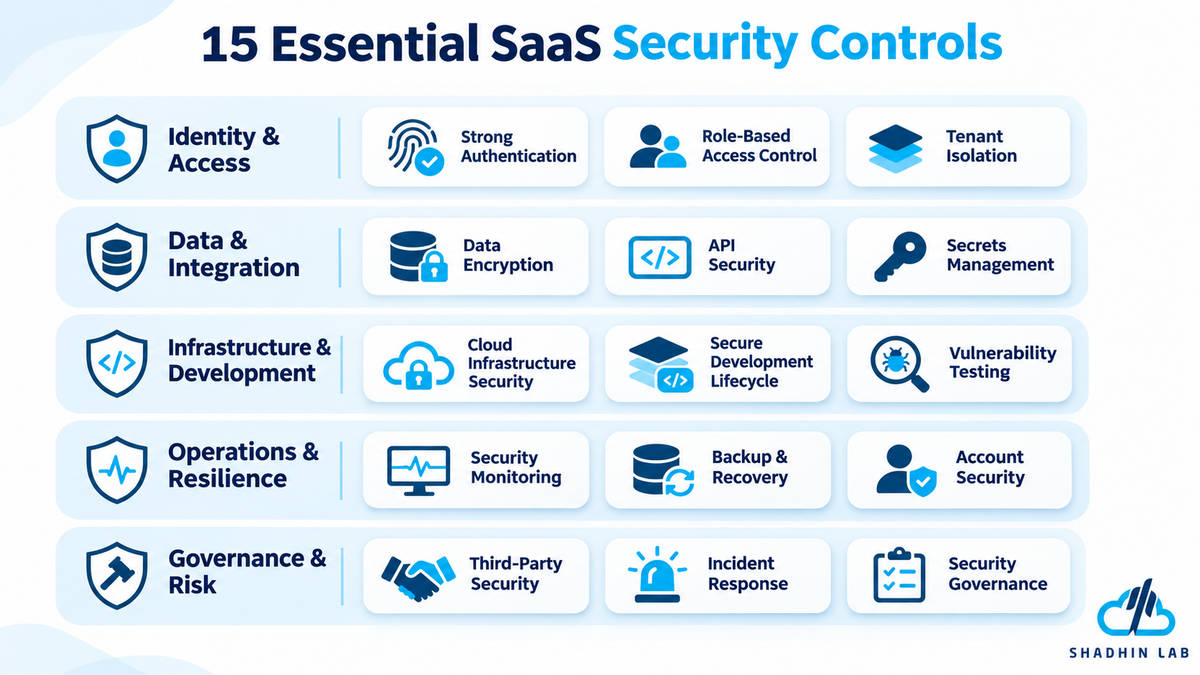
The following 15 controls provide a practical starting point for reviewing a SaaS application’s security. Each one includes implementation considerations that development and security teams can use to assess their current practices.
1. Enforce Strong Authentication
Security objective: Prevent unauthorized users from accessing SaaS accounts.
Authentication verifies that a user or service is who it claims to be. Weak authentication can expose customer accounts, administrative functions, and sensitive business information.
Use this checklist to review your authentication controls:
- Establish appropriate password requirements and reject commonly used or compromised passwords where supported.
- Support multi-factor authentication (MFA).
- Require stronger authentication protections for privileged and administrator accounts.
- Store passwords using established password-hashing methods designed for password storage.
- Protect password-reset and account-recovery workflows against unauthorized changes.
- Apply appropriate protections against brute-force and credential-stuffing attacks.
MFA is particularly important for accounts with access to production systems, customer records, or security settings. A password alone may be insufficient if it has been reused, exposed, or stolen.
However, authentication is only one part of access security. A successful login does not automatically mean a user should have access to every resource. That decision belongs to authorization controls.
How to verify it: Review login, recovery, and MFA flows. Test whether privileged accounts can access sensitive functions without the required authentication protections.
2. Implement Role-Based Access Control and Least Privilege
Security objective: Ensure users and services only access the resources they need.
Once an identity is authenticated, the application must determine what that identity can do. This is authorization.
Role-based access control (RBAC) assigns permissions through predefined roles. For example, a SaaS application might have separate roles for administrators, managers, and standard users. Attribute-based access control (ABAC) evaluates additional attributes, such as department, resource ownership, location, or other contextual conditions.
Both approaches can support access management, depending on the application’s complexity.
Your access-control checklist should include:
- Define roles and permissions around actual business responsibilities.
- Apply least-privilege access to users, administrators, and service accounts.
- Restrict sensitive administrative operations.
- Review permissions regularly and remove unnecessary access.
- Update access when employees change roles or leave.
- Test authorization rules at both application and API levels.
One important mistake is treating interface visibility as authorization. Hiding an administrative button does not prevent an unauthorized user from calling the corresponding API directly.
How to verify it: Attempt restricted operations using accounts with different roles. Confirm that the server rejects unauthorized requests, even when users bypass the normal interface.
3. Secure Multi-Tenant Architecture and Tenant Isolation
Security objective: Prevent one customer or tenant from accessing another tenant’s information.
Multi-tenant security is one of the most important considerations for SaaS applications that serve multiple organizations through shared infrastructure.
Imagine a platform used by Company A and Company B. A user from Company A should only access records belonging to Company A, even if both companies use the same application and database. If an attacker changes an object ID or request parameter and retrieves Company B’s customer records, the application has failed to enforce tenant isolation.
Use this checklist:
- Establish tenant context using server-verified identity and membership.
- Enforce tenant ownership checks on database queries and resource access.
- Apply tenant isolation to caches, file storage, background jobs, and other shared components.
- Test for cross-tenant access and privilege escalation.
- Never treat a tenant identifier supplied by a client as proof of authorization.
- Monitor suspicious cross-tenant access attempts.
Tenant isolation does not necessarily require a separate database for every custom er. Shared-database architectures can be designed securely when access boundaries are enforced consistently. The appropriate isolation model depends on the application’s architecture, customer requirements, and risk profile.
How to verify it: Use test accounts from different tenants to attempt access to one another’s records, files, and API resources. Include background jobs and cached data in the review, not just normal application requests.
OWASP’s Multi-Tenant Security Cheat Sheet provides additional guidance on enforcing tenant boundaries across data access and application components.
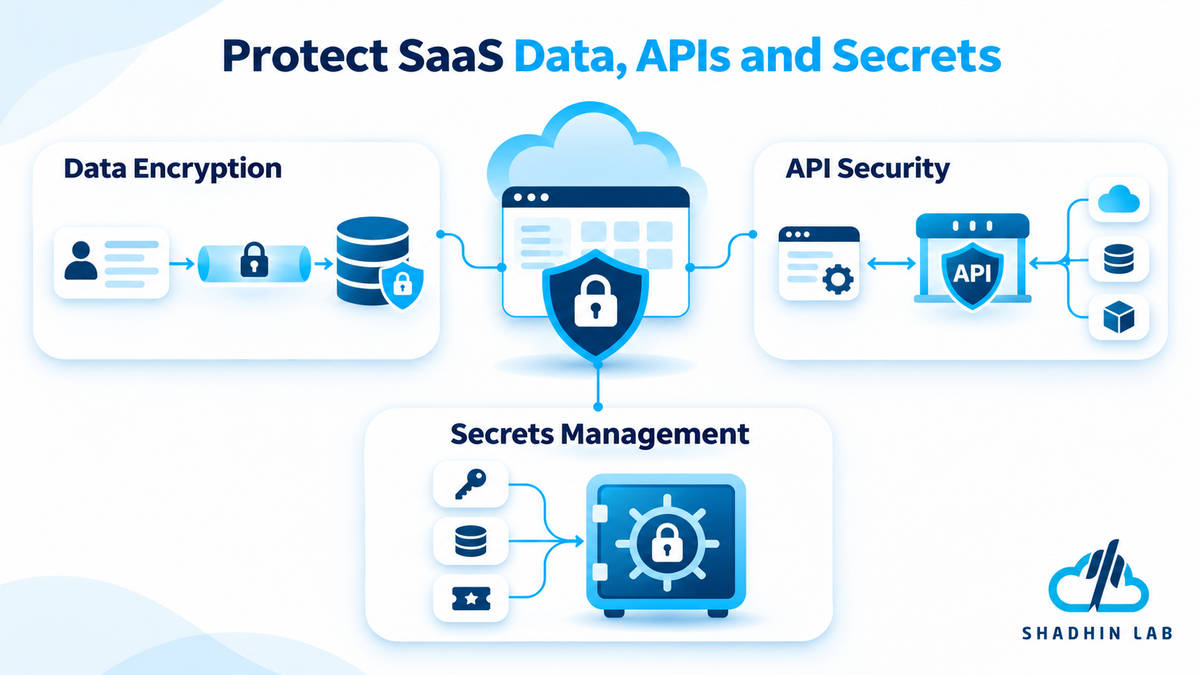
4. Encrypt Sensitive Data in Transit and at Rest
Security objective: Reduce the risk of unauthorized disclosure of sensitive information.
SaaS applications transmit and store customer data across different services. Encryption helps protect this information when it moves between systems and while it is stored.
Your checklist should include:
- Use HTTPS and appropriately configured TLS for data in transit.
- Encrypt sensitive stored data using suitable encryption mechanisms.
- Protect database backups, exported files, and other copies of customer information.
- Restrict access to encryption keys.
- Establish key rotation and lifecycle-management procedures.
- Identify where sensitive data is stored, processed, and transmitted.
Encryption is not a replacement for access control. An application can encrypt its database and still expose customer information through excessive permissions, insecure APIs, or application vulnerabilities.
How to verify it: Review transport security, database and storage configurations, backup protection, and key-access permissions. Confirm that encryption controls cover the data flows and storage locations that actually contain sensitive information.
5. Secure APIs and External Integrations
Security objective: Protect the interfaces through which users, applications, and services communicate.
APIs allow SaaS applications to connect with web applications, mobile clients, internal services, and third-party platforms. However, an insecure API can expose sensitive operations even when the main application interface appears secure.
Apply these controls:
- Authenticate API clients and verify authorization for every sensitive operation.
- Validate incoming data and reject unexpected or invalid input.
- Apply rate limits and resource-consumption controls.
- Use short-lived or appropriately scoped credentials where practical.
- Protect API keys and access tokens from exposure.
- Review third-party integrations and their permissions.
- Monitor unusual API activity and repeated authentication failures.
Common API security concerns include broken object-level authorization, excessive data exposure, and unrestricted resource consumption. For example, an API might verify that a user is logged in but fail to check whether that user is authorized to access a specific customer’s invoice.
How to verify it: Test API endpoints with different user roles and tenant identities. Review whether sensitive operations enforce ownership checks and whether API responses expose only the information required.
6. Protect Secrets, Credentials, and Environment Variables
Security objective: Prevent attackers from obtaining credentials that provide access to applications and infrastructure.
Secrets include API keys, database passwords, authentication tokens, private keys, and other credentials used by applications and services. Exposing one of these values can create access paths that bypass normal user authentication.
Use this checklist:
- Store secrets in a dedicated secrets-management system.
- Avoid hardcoding API keys, passwords, and tokens in source code.
- Restrict secret access according to workload and user permissions.
- Rotate credentials based on risk, exposure, and operational requirements.
- Remove exposed, expired, or unused credentials.
- Scan repositories and deployment artifacts for accidentally committed secrets.
Secrets can appear in more places than application configuration files. They may also be present in source repositories, CI/CD systems, container configurations, logs, and third-party integrations.
How to verify it: Review repository scanning results, deployment configurations, and secret-access policies. If a credential is exposed, revoke or rotate it and investigate whether it was used.
7. Harden Cloud Infrastructure and Network Access
Security objective: Reduce exposure caused by misconfigured cloud services and unnecessary network access.
A SaaS application’s security depends on the infrastructure supporting it. Publicly exposed storage, unrestricted database access, outdated services, and poorly configured network rules can undermine otherwise reasonable application controls.
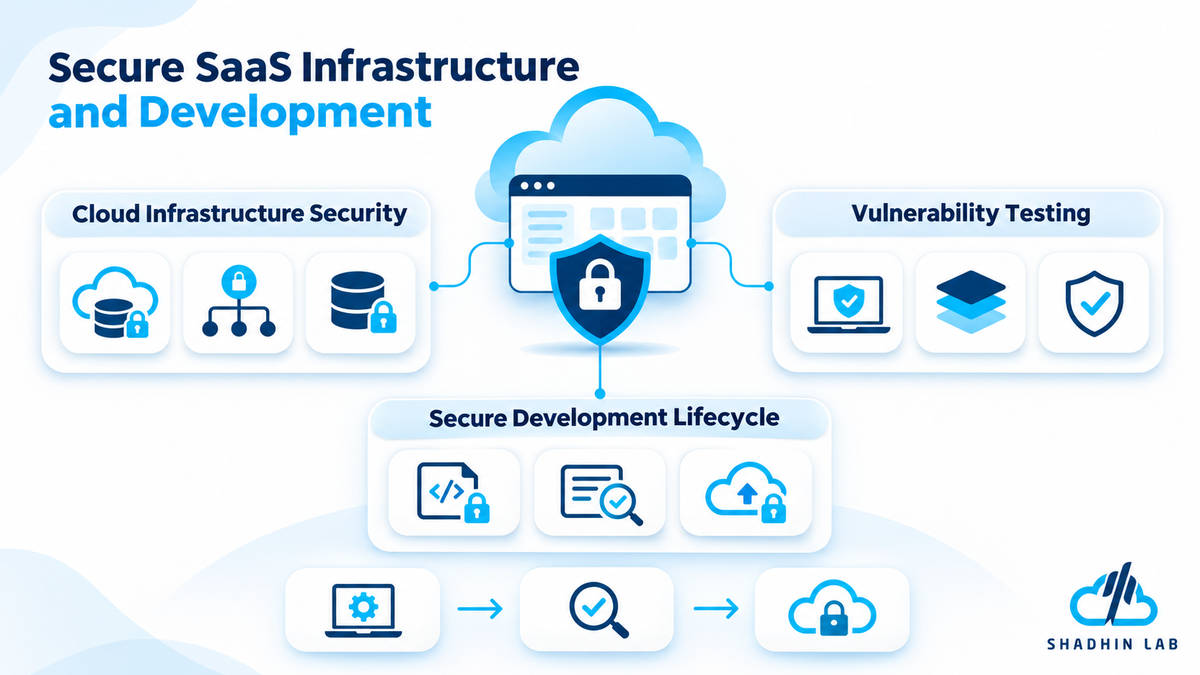
Your infrastructure checklist should include:
- Review cloud storage permissions and public exposure.
- Restrict access to databases and internal services.
- Segment sensitive workloads where appropriate.
- Apply secure configurations to virtual machines, containers, and managed services.
- Remove unused ports, services, and infrastructure resources.
- Monitor configuration changes and suspicious infrastructure activity.
Cloud infrastructure should expose only the services and endpoints necessary for the application to operate. Administrative interfaces and internal databases should not be publicly accessible without a specific, justified requirement and appropriate protections.
How to verify it: Review network rules, storage permissions, service exposure, infrastructure configurations, and administrative access. Reassess these settings when the architecture or deployment environment changes.
8. Secure the Software Development Lifecycle
Security objective: Identify security problems before vulnerable code reaches production.
Security should be part of software development from the planning stage through deployment and maintenance. Waiting until a product is ready for release can make vulnerabilities more expensive and difficult to address.
Use this checklist:
- Establish secure coding standards for development teams.
- Conduct threat modeling for sensitive features and architectural changes.
- Review code changes before merging them into protected branches.
- Use static application security testing (SAST) where appropriate.
- Scan dependencies for known vulnerabilities.
- Protect source-code repositories and development environments.
- Restrict CI/CD permissions and deployment credentials.
Threat modeling helps teams consider how a feature could be misused before implementation. For example, a new file-sharing feature may require additional checks for file ownership, tenant boundaries, and access permissions.
The OWASP Application Security Verification Standard (ASVS) provides a structured resource for defining and verifying application security requirements.
How to verify it: Review development policies, repository protections, CI/CD permissions, security-testing results, and how teams handle identified vulnerabilities.
9. Perform Regular Vulnerability Scanning and Security Testing
Security objective: Find and address vulnerabilities before they can be exploited.
SaaS applications change continuously. New features, dependency updates, infrastructure changes, and configuration modifications can introduce security weaknesses over time.
Your testing checklist should include:
- Scan applications and dependencies for known vulnerabilities.
- Conduct security testing before major releases.
- Test authentication, authorization, and tenant isolation.
- Assess exposed APIs and administrative interfaces.
- Prioritize remediation based on severity and business impact.
- Verify fixes after remediation.
Different testing methods serve different purposes. Automated vulnerability scanning helps identify known issues and common weaknesses. Penetration testing involves examining an application from an attacker’s perspective to identify exploitable paths. Broader application security testing may include manual review of business logic, architecture, and access-control behavior.
Automated scans are useful, but they cannot reliably identify every business-logic flaw or architectural weakness. Similarly, a penetration test evaluates a defined scope at a particular point in time; it does not guarantee that an application is secure.
How to verify it: Review testing coverage, unresolved findings, remediation timelines, and evidence that fixes have been retested.
10. Maintain Secure Logging, Monitoring, and Alerting
Security objective: Detect suspicious activity and preserve information needed for investigation.
Logging and monitoring help teams understand what is happening inside a SaaS application. Without useful security logs, identifying the source and impact of an incident can become difficult.
Your checklist should include:
- Log authentication events and failed access attempts.
- Record sensitive administrative actions.
- Monitor unusual API requests and account activity.
- Include relevant tenant context in tenant-specific security events.
- Protect logs against unauthorized access and modification.
- Define appropriate retention and review policies.
- Configure alerts for meaningful security events.
For multi-tenant applications, logs should contain enough context to help investigators determine which tenant and resources were involved. At the same time, logging systems must avoid collecting unnecessary customer information.
Never include passwords, access tokens, session identifiers, or other sensitive credentials in ordinary application logs.
How to verify it: Review whether important security events are recorded, whether alerts reach the responsible team, and whether logs are protected. Test whether an investigator can reconstruct relevant activity without exposing unnecessary customer data.
11. Establish Data Backup and Disaster Recovery Procedures
Security objective: Maintain availability and recover critical information after data loss, infrastructure failure, or a security incident.
Backups help protect SaaS businesses against accidental deletion, infrastructure failures, and certain security incidents. However, creating backups is not enough. Teams must also know whether they can restore the application and its data within acceptable timeframes.
Use this checklist:
- Define backup frequency according to business and data requirements.
- Encrypt backups and restrict access to them.
- Maintain protected backup copies.
- Test restoration procedures regularly.
- Define recovery time objectives (RTO) and recovery point objectives (RPO).
- Verify tenant-specific recovery procedures where applicable.
RTO describes how quickly a service should be restored after disruption. RPO defines how much data loss, measured in time, the business can tolerate.
For a multi-tenant platform, recovery planning should also consider whether data can be restored for an individual tenant when necessary without disrupting unrelated customers.
How to verify it: Perform restoration exercises and document the results. Confirm that the restored data is usable and that recovery procedures meet the organization’s defined requirements.
12. Secure Employee, Administrator, and Service Accounts
Security objective: Reduce risks associated with internal access and non-human identities.
Not every security risk originates from an external customer account. Employees, contractors, administrators, automated workloads, and integrations may all have access to sensitive systems.
Your checklist should include:
- Require MFA for privileged users.
- Restrict production access to authorized employees.
- Review employee and administrator permissions.
- Remove access promptly during employee offboarding.
- Use dedicated service identities for automated workloads.
- Monitor privileged account activity.
- Avoid sharing administrator credentials.
Service accounts deserve particular attention. An automated process may need access to a database or API, but that does not mean it should receive unrestricted permissions across the entire environment.
How to verify it: Review account inventories, privileged access, service-account permissions, and offboarding records. Investigate accounts that are inactive, shared, or no longer associated with a valid business requirement.
13. Manage Third-Party and Supply Chain Security
Security objective: Reduce risks introduced by external software, vendors, and service providers.
SaaS applications rely on external services and software dependencies. These may include cloud providers, payment processors, authentication services, analytics platforms, open-source libraries, and development tools.
A weakness in a connected service can affect the security of the wider application.
Use this checklist:
- Maintain an inventory of critical third-party services and dependencies.
- Evaluate vendors based on the data and access they receive.
- Review integration permissions and revoke unnecessary access.
- Monitor dependency vulnerabilities.
- Establish a process for reviewing security incidents involving vendors.
- Document important security and contractual responsibilities.
Vendor reviews should consider what information a provider can access, how that information is protected, and what happens if the service experiences an incident.
How to verify it: Review vendor inventories, integration permissions, dependency scanning results, and relevant contractual or security documentation.
14. Create an Incident Response Plan
Security objective: Ensure the team can respond consistently when a security incident occurs.
Even with preventive controls, SaaS businesses need a plan for handling incidents. Account compromise, data exposure, ransomware, service disruption, and third-party breaches may require different technical and communication responses.
Your incident response checklist should include:
- Define incident severity levels and escalation procedures.
- Assign incident response roles and responsibilities.
- Establish procedures for isolating affected systems or accounts.
- Prepare customer and stakeholder communication processes.
- Preserve evidence for investigation.
- Conduct incident-response exercises.
- Document lessons learned and remediation actions.
A useful plan should explain who makes decisions, who investigates technical issues, and who communicates with affected customers and stakeholders. It should also account for contractual and legal notification obligations where applicable.
The NIST Cybersecurity Framework 2.0 provides a useful structure for organizing cybersecurity activities through six functions: Govern, Identify, Protect, Detect, Respond, and Recover.
How to verify it: Run tabletop exercises or other response simulations. Check whether team members understand their responsibilities and can follow the documented procedures.
15. Establish Security Governance, Privacy, and Compliance Practices
Security objective: Make security responsibilities measurable, documented, and aligned with business and customer requirements.
Technical controls need organizational support. SaaS companies should establish policies, assign responsibilities, and maintain evidence that important security activities are being performed.
Use this checklist:
- Document security policies and responsibilities.
- Identify applicable legal, regulatory, and contractual requirements.
- Establish data retention and deletion policies.
- Maintain a process for handling customer data requests.
- Review security controls periodically.
- Document exceptions and remediation plans.
- Maintain evidence of important security activities.
Several frameworks and requirements may be relevant to SaaS companies:
| Framework or Regulation | General Purpose |
| SOC 2 | Provides an independent attestation framework for evaluating controls relevant to specified trust services criteria. |
| ISO/IEC 27001 | Specifies requirements for establishing, implementing, maintaining, and continually improving an information security management system. |
| GDPR | Establishes data protection requirements for processing personal data within its scope. |
| HIPAA | Establishes requirements for protecting certain health information in applicable contexts. |
| PCI DSS | Provides security requirements for environments that store, process, or transmit payment card data within its scope. |
These frameworks and regulations are not interchangeable. Their applicability depends on the SaaS company’s activities, customer commitments, data types, and jurisdictions.
Completing this checklist does not automatically make a company SOC 2 compliant, ISO 27001 certified, or compliant with a particular regulation. Organizations need to assess the requirements that apply to them and maintain appropriate evidence.
How to Prioritize SaaS Security Improvements
A SaaS team may not have the resources to implement every security improvement at once. The practical approach is to prioritize based on risk, exposure, business impact, and existing weaknesses.
Start With Essential Security Controls
Begin by reviewing foundational protections:
- Authentication and MFA for privileged access.
- Authorization and least-privilege permissions.
- Multi-tenant isolation.
- Encryption and secrets management.
- Secure API access.
- Vulnerability identification and remediation.
- Tested backups and incident response.
These controls address important areas of application and operational security. However, their priority should still reflect the product’s architecture, customer data, and threat exposure.
Build a Continuous Security Improvement Process
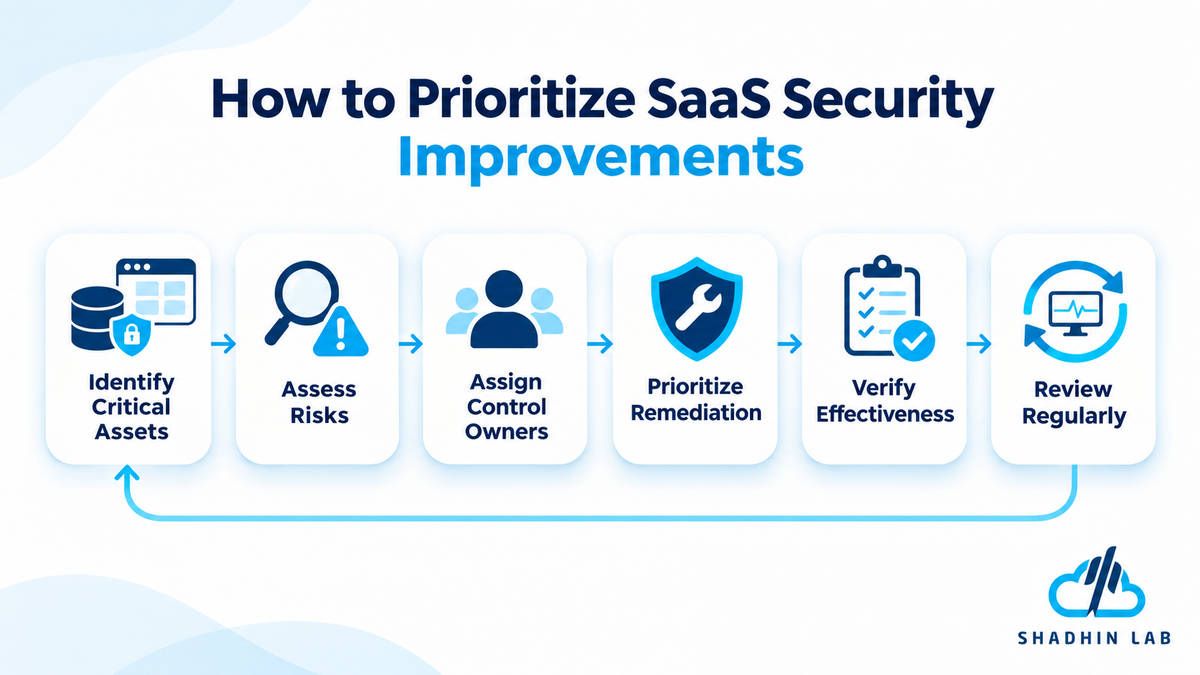
A repeatable security review process helps teams move from isolated fixes to ongoing risk management.
- Identify critical assets: Document sensitive data, important services, application components, and external dependencies.
- Assess risks: Examine threats, existing weaknesses, and potential business impact.
- Assign control owners: Make individuals or teams responsible for implementing and maintaining specific protections.
- Prioritize remediation: Address the most significant risks and exposed weaknesses first.
- Verify effectiveness: Test whether the implemented controls work as intended.
- Review regularly: Reassess the security program when the product, infrastructure, or threat environment changes.
NIST CSF 2.0 can help organize this process. Its six functions—Govern, Identify, Protect, Detect, Respond, and Recover—provide a risk-management structure rather than a mandatory certification or universal implementation timeline.
Common SaaS Security Mistakes to Avoid
Even when a SaaS company has several security controls in place, certain mistakes can undermine their effectiveness.
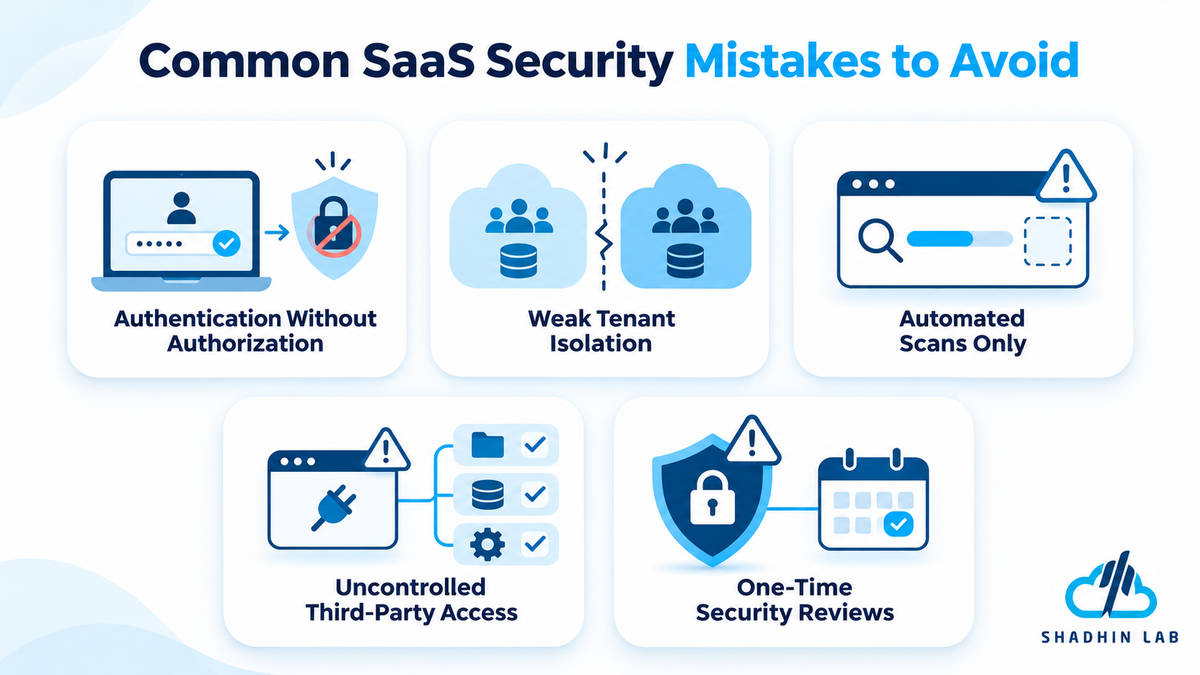
Treating Authentication as Complete Security
A secure login system does not protect resources if authorization checks are missing or incorrectly implemented. Every sensitive operation needs appropriate permission checks.
Assuming Tenant IDs Guarantee Data Isolation
A tenant identifier is not proof that a user belongs to that tenant. Applications must verify tenant membership and enforce ownership rules across database queries, APIs, files, and other resources.
Relying Only on Automated Security Scans
Automated tools can identify many known vulnerabilities, but they may miss business-logic flaws, authorization weaknesses, and architecture-level issues. Combine automated testing with appropriate manual security reviews.
Ignoring Third-Party and Internal Access
External integrations, service accounts, CI/CD systems, and employee permissions can create additional paths into an application. Review these access points as part of the security program.
Treating Security as a One-Time Project
New features, changing dependencies, infrastructure updates, and evolving threats require ongoing reviews. Security should remain part of product development and operations.
Frequently Asked Questions About SaaS Security
What Is a SaaS Security Checklist?
A SaaS security checklist is a structured set of controls used to assess and improve the security of SaaS applications, infrastructure, data, identities, and operations. It helps teams identify weaknesses and review protections such as authentication, tenant isolation, encryption, monitoring, and incident response.
What Are the Biggest Security Risks for SaaS Companies?
Common risks include unauthorized account access, customer data exposure, cross-tenant vulnerabilities, insecure APIs, cloud misconfiguration, compromised credentials, vulnerable software dependencies, and service disruption. The specific risks depend on the application’s architecture, data, and integrations.
How Can a SaaS Company Protect Customer Data?
A SaaS company can protect customer data through encryption, appropriate access controls, tenant isolation, secure APIs, data retention policies, monitoring, and tested backups. These controls should be supported by secure development practices and regular security reviews.
What Is Multi-Tenant Security?
Multi-tenant security protects customer environments and data when multiple organizations use a shared SaaS application or infrastructure. It ensures that users can access only the information and resources belonging to their authorized tenant.
Is SaaS Security the Responsibility of the Provider or Customer?
SaaS security involves shared responsibilities. Providers manage the security of their application and underlying service, while customers still need to configure access, manage users, protect credentials, and use the service securely. Exact responsibilities depend on the service, agreement, and security arrangements.
Which Security Frameworks Should SaaS Companies Follow?
OWASP ASVS can help define and verify application security requirements, while NIST CSF 2.0 supports organizational cybersecurity risk management. SOC 2 and ISO/IEC 27001 address different assurance and information security management needs. The appropriate framework depends on business objectives, customer expectations, and applicable requirements.
How Often Should SaaS Security Be Reviewed?
Security should be monitored continuously, with formal reviews and testing scheduled according to risk, product changes, and organizational requirements. Major architectural updates, new integrations, significant releases, and security incidents may also require additional assessments.
Conclusion
SaaS security is not limited to protecting infrastructure or adding multi-factor authentication. It requires coordinated controls across application architecture, tenant isolation, authentication, APIs, data protection, development, monitoring, and incident response.
Use this checklist to identify gaps, assign responsibilities, and prioritize improvements based on your product’s actual risks. As your SaaS application grows, revisit these controls to account for new features, customers, integrations, and operational requirements. If you are developing an AI-powered SaaS application or modernizing an existing product, explore ShadhinLab’s AI solutions to discuss your application development requirements.

Shaif Azad
Shaif Azad Rahi is an AI/ML professional and Solution Engineer at Shadhin Lab, specializing in AI-powered solutions and scalable software systems, with a focus on applying AI to solve real-world business challenges.
Related Post
ERP vs CRM: Which Is Right for Your Business?
Imagine a growing business where sales representatives track leads in spreadsheets while the operations team manages...
AI Tokens Explained: How They Work and Why They Matter
When you ask an AI chatbot a question, summarize a document, or build an AI-powered application,...
Vibe Coding Security Risks: What to Watch For
Vibe coding makes it easier to build applications by describing what you want and letting AI...
