
Vibe Coding Security Risks: What to Watch For
Table of Contents
Vibe coding makes it easier to build applications by describing what you want and letting AI coding tools generate the code. Founders, developers, and nontechnical builders can now create prototypes and functional applications faster than ever. However, speed can come at a cost when generated code is deployed without proper security checks. Exposed API keys, weak access controls, database misconfigurations, and vulnerable dependencies can put applications and user data at risk.
Understanding the main vibe coding security risks helps you identify potential weaknesses and take practical steps to protect your application before launch.
Table of Contents
Key Takeaways
- AI-generated code can contain common software vulnerabilities, even when an application works as expected.
- Exposed credentials, broken access controls, and insecure database configurations can put sensitive information at risk.
- AI coding agents may introduce additional risks when they can execute commands, access files, or use external services.
- Security scans, dependency audits, secret detection, and realistic testing help identify weaknesses before deployment.
- Applications handling payments, sensitive data, or critical business operations may need a qualified security review.
What Are Vibe Coding Security Risks?
Vibe coding is a software development approach in which people use natural-language prompts to describe an application or feature and rely heavily on AI to generate and modify the code. Instead of writing every line manually, a builder might ask an AI tool to create a login page, connect a database, or implement a payment workflow.
This approach can accelerate development, but generated code still needs to be reviewed, tested, and configured correctly.
Vibe coding security risks generally fall into three categories.
Code-level vulnerabilities occur when generated code handles authentication, user input, database queries, or permissions incorrectly. For example, an application might allow a logged-in user to access another user’s private records.
Configuration risks arise when developers expose API keys, configure databases with excessive permissions, or deploy applications with insecure settings.
AI workflow risks emerge when coding agents receive broad access to files, terminals, repositories, or external services. They may also encounter malicious instructions hidden in untrusted content.
These problems are not unique to AI-generated software. Traditional applications can have the same weaknesses. The challenge is that vibe coding can make it easy to produce working features without fully understanding how they behave under unauthorized access or malicious requests.
The key principle is simple: an application that works correctly is not necessarily secure.
7 Major Vibe Coding Security Risks
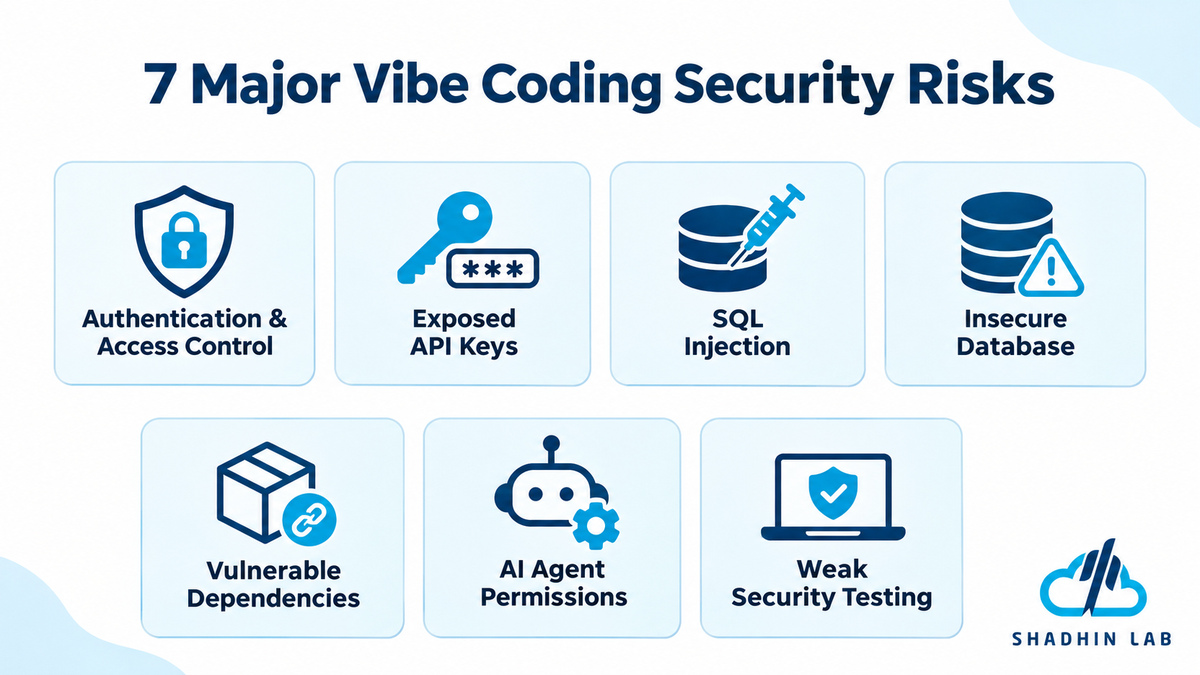
1. Broken Authentication and Access Control
Authentication verifies who a user is. Authorization determines what that user is allowed to do. Both are essential for protecting an application.
AI-generated code may implement a login page and session management while overlooking server-side authorization checks. As a result, users might access information or perform actions that should be restricted.
Imagine a project-management application where users can view their own projects. If the backend accepts a project ID without checking ownership, a user might change the ID in an API request and retrieve another person’s project.
This is an example of broken access control. A successful login does not automatically protect every endpoint or database record.
How to reduce the risk:
- Enforce authorization on the server, not only in the frontend.
- Check whether the current user has permission to access each requested resource.
- Use role-based permissions when different users need different levels of access.
- Test the application with multiple accounts and different permission levels.
- Verify that administrative actions require appropriate privileges.
2. Exposed API Keys and Sensitive Credentials
AI coding tools may generate code that connects to payment providers, databases, email services, or other external APIs. If private credentials are placed in frontend code or committed to a public repository, unauthorized people may be able to use them.
For example, an AI-generated frontend might contain a private API key directly in a JavaScript file. Because browser code is visible to users, hiding the key in the interface does not make it secret.
Credentials can also leak through configuration files, version-control history, application logs, or prompts submitted to external AI services.
How to reduce the risk:
- Keep private API keys and service credentials on the server.
- Use environment variables or a dedicated secrets-management service.
- Enable secret scanning in your code repository where available.
- Review source history, deployment settings, and logs for exposed credentials.
- Rotate or revoke any credential that may have been compromised.
GitHub documents how secret scanning can detect exposed credentials in repositories. However, scanning should be combined with secure credential storage and careful access management.
3. SQL Injection and Unsafe Input Handling
Applications often accept input through search boxes, registration forms, file uploads, comments, and API requests. If that input is handled incorrectly, attackers may be able to manipulate application behavior.
SQL injection occurs when untrusted input changes the meaning of a database query. Cross-site scripting (XSS) can allow malicious scripts to execute in another user’s browser. Command injection can occur when user-controlled data is passed unsafely to operating-system commands.
Consider a search feature that builds a database query by inserting the user’s search text directly into an SQL statement. Specially crafted input might alter the query rather than simply search for a record.
An AI tool may generate a feature that works with ordinary inputs while failing to handle malicious or unexpected ones.
How to reduce the risk:
- Use parameterized queries instead of constructing SQL statements through string concatenation.
- Apply established security libraries and frameworks.
- Validate input on the server according to the expected format and limits.
- Encode output appropriately for its context to reduce XSS risk.
- Avoid passing untrusted input directly to shell commands.
- Test edge cases and malformed requests, not just normal user behavior.
Input validation is useful, but it should not replace protections designed for the specific vulnerability.
4. Insecure Database and API Configuration
A database connection working correctly does not mean the database is configured securely.
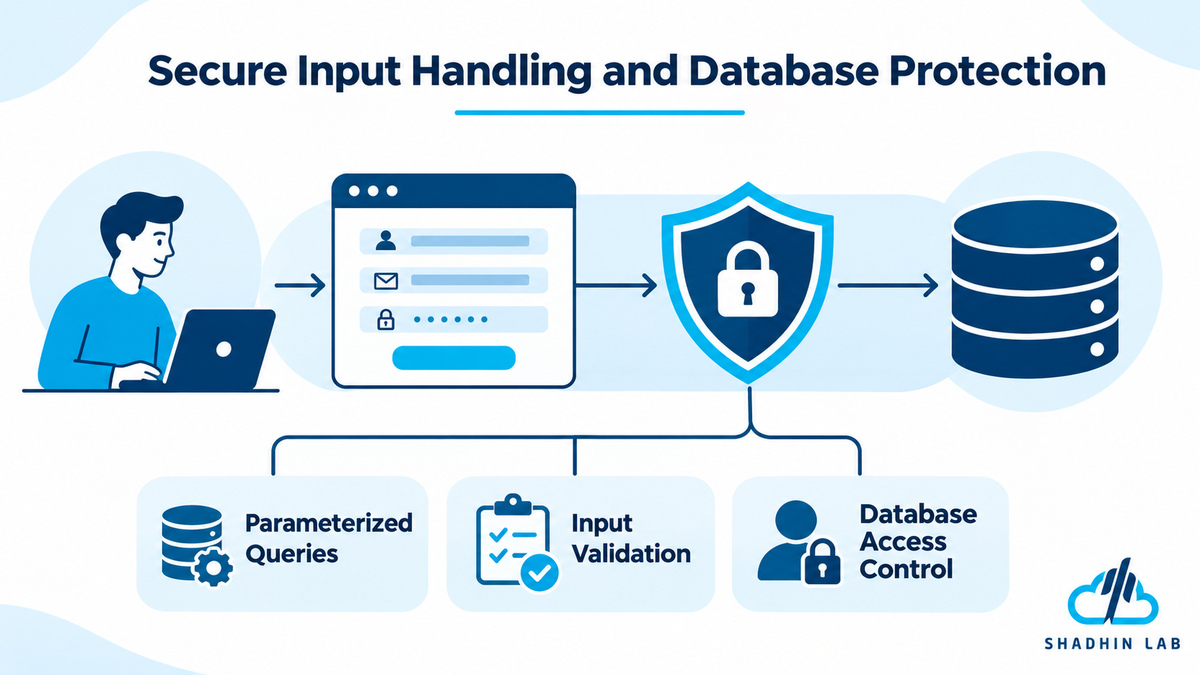
AI-generated applications may use overly permissive database credentials, expose endpoints without proper authorization, or omit row-level security (RLS) policies. RLS allows a database to restrict which rows a user can access according to defined rules.
For example, a customer portal might display each customer their own account information. If the database policies are missing or incorrectly configured, one customer could potentially retrieve another customer’s records by changing a request parameter.
Similar problems can affect file storage, administrative endpoints, and third-party integrations.
How to reduce the risk:
- Apply the principle of least privilege: give each user, service, and application component only the permissions it needs.
- Review database access policies and test them with different user accounts.
- Protect sensitive API endpoints with appropriate authentication and authorization.
- Check whether file storage and database resources are unintentionally public.
- Review production settings separately from development settings.
- Never assume that hiding a frontend button prevents someone from calling its underlying API.
5. Vulnerable or Hallucinated Dependencies
Modern applications rely on external packages and libraries. AI coding tools may suggest outdated dependencies, vulnerable versions, incorrect installation commands, or package names that do not exist.
A related supply-chain threat is called slopsquatting. It describes a scenario in which an attacker registers a package name hallucinated by an AI tool, hoping that developers or automated coding agents will install it without verification. If the malicious package executes code during installation or use, it could compromise the development environment or application.
This is a credible risk category, but it should not be interpreted as evidence that every hallucinated package has been registered maliciously.
OWASP’s Secure Coding with AI guidance recommends verifying AI-suggested packages and checking dependencies for known vulnerabilities.
How to reduce the risk:
- Verify that every suggested package exists in the intended package registry.
- Check package maintainers, release history, and project activity.
- Run dependency audits and review known vulnerability advisories.
- Avoid installing unfamiliar packages simply because an AI tool recommends them.
- Use trusted registries and automated dependency checks in your development workflow.
6. Unsafe AI Agent Permissions and Prompt Injection
Not every AI coding tool has the same capabilities. Some primarily suggest code, while others can edit files, execute terminal commands, install packages, access repositories, or interact with external services.
The more authority an agent has, the more important it becomes to restrict what it can do.
Prompt injection is another concern. An AI agent may encounter untrusted instructions embedded in a repository issue, documentation file, webpage, or other content. Those instructions could attempt to influence the agent to reveal information, modify files, or perform unsafe actions.
The problem becomes more serious when the agent has access to sensitive credentials or can execute commands without approval.
How to reduce the risk:
- Run coding agents in sandboxed environments when practical.
- Limit filesystem access, network access, and available tools.
- Avoid providing production credentials unless genuinely necessary.
- Require approval for sensitive actions, such as deploying changes or modifying production data.
- Treat instructions found in untrusted files and webpages as potentially malicious.
- Review agent permissions before enabling automatic command execution.
AI agents can be useful development assistants, but their permissions should match the task rather than automatically granting unrestricted access.
7. Weak Testing, Logging, and Error Handling
A successful demonstration does not prove that an application is secure. A login flow might work, a payment page might load, and an AI-generated test suite might pass while important security weaknesses remain.
For example, the tests may confirm that a user can view their own account but never check whether the same user can access someone else’s account through a modified API request.
Poor error handling can also expose internal details, while careless logging may record passwords, access tokens, or other sensitive information.
How to reduce the risk:
- Test unauthorized access and unexpected requests.
- Check that errors do not reveal sensitive implementation details.
- Avoid logging passwords, tokens, or unnecessary personal information.
- Monitor suspicious activity and investigate unusual access patterns.
- Combine automated tests with independent security checks.
- Review high-impact code changes before release.
Security testing should examine how the application behaves when someone deliberately tries to misuse it, not only when a legitimate user follows the expected workflow.
How to Secure a Vibe-Coded App Before Launch
You do not need to begin with an expensive enterprise security program for every small prototype. You do need a repeatable process that matches the application’s risks.
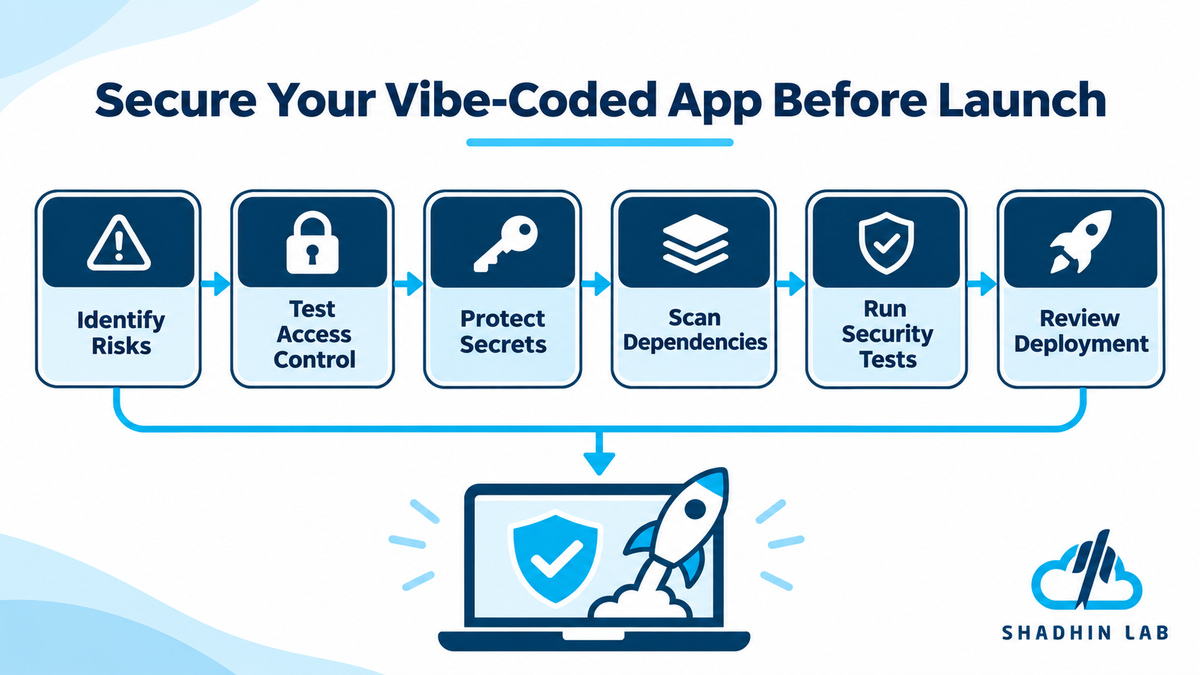
Step 1. Identify Sensitive Data and Critical Actions
Start by identifying what your application stores and what could cause harm if misused.
Consider personal information, payment details, uploaded files, account settings, administrative functions, and business records. Determine which actions should be restricted and who should be allowed to perform them.
This initial assessment helps you prioritize security work instead of treating every feature as equally risky.
Step 2. Test Authentication and Authorization
Create separate test accounts and check whether each user can access only the information they are authorized to see.
Try opening protected pages without signing in. Test whether users can access other people’s records by changing resource IDs or API parameters. Check whether ordinary users can trigger administrative actions.
Verify permissions on the backend and database, not just in the user interface.
Step 3. Protect Secrets and Audit Dependencies
Scan the repository and its history for API keys, tokens, passwords, and other credentials. Check frontend bundles, configuration files, and logs for accidental exposure.
Next, audit the application’s dependencies for known vulnerabilities and verify unfamiliar packages before installing them. If a credential has been exposed, revoke or rotate it rather than simply deleting it from the latest version of the code.
Step 4. Run Automated Security Checks
Use appropriate automated tools to find common problems.
| Security check | What it helps identify |
| Static application security testing (SAST) | Potential weaknesses in source code |
| Software composition analysis (SCA) | Known vulnerabilities in third-party dependencies |
| Secret scanning | Credentials accidentally committed to code |
| Dynamic application security testing (DAST) | Certain vulnerabilities in a running application |
Each method has limitations. A scanner may miss a business-logic flaw, misunderstand application context, or produce false positives. Passing a scan is useful evidence, not a guarantee that the application is secure.
Step 5. Test Realistic Abuse Scenarios
Test the application from an attacker’s perspective.
Check unauthorized access, malformed input, session expiration, file uploads, rate limits, and unexpected API requests. Where relevant, verify that users cannot bypass payment requirements or repeat sensitive actions in unintended ways.
A simple but valuable test is to create two accounts and confirm that neither account can read or modify the other account’s private records.
For applications with more complex risks, consider a structured security test performed by a qualified professional.
Step 6. Review Deployment and Monitor the Application
Before launch, verify that HTTPS is enabled, production credentials are separate from development credentials, and databases and service accounts have appropriate permissions.
Set up backups, logging that avoids sensitive information, monitoring, and a rollback plan. Keep dependencies updated and establish a process for responding to security alerts.
Security is not a one-time pre-launch task. Applications change as new features, integrations, and dependencies are added, so the review process should continue after deployment.
Can You Trust AI to Review Its Own Code?
AI can help explain unfamiliar code, identify suspicious patterns, suggest safer implementations, and generate tests. These capabilities can make security reviews more accessible to developers and nontechnical builders.
However, AI-generated reviews should not be treated as independent proof of security. A tool may overlook a weakness in code it previously generated, misunderstand the application’s authorization model, or create tests that fail to cover important attack scenarios.
A better approach is to use several complementary checks:
- Ask AI to explain security-sensitive code and identify potential weaknesses.
- Run independent security scanners and dependency audits.
- Manually inspect authentication, authorization, data handling, and other high-impact features.
- Test realistic misuse scenarios.
- Obtain a qualified security review when the application’s risk warrants it.
AI review is valuable as one layer of defense. It should complement, rather than replace, established security practices and human accountability.
When Should You Get a Professional Security Review?
The right level of review depends on what could happen if your application is compromised.
A simple prototype with no sensitive data may need a different level of scrutiny from a production application that processes payments, stores personal information, manages business-critical records, or integrates with internal company systems.
Consider professional review when your application handles sensitive data, exposes privileged administrative functions, performs financial operations, or will be used by many customers.
Depending on the scope, a review may examine application architecture, authentication, authorization, database permissions, third-party integrations, deployment configuration, and incident-response readiness.
Before hiring a provider, confirm what the engagement includes. Code review, vulnerability assessment, and penetration testing are different activities, and not every development service includes formal security testing.
For businesses building AI-powered applications, secure implementation and appropriate technical review should be part of the development plan from the beginning.
Common Mistakes to Avoid When Vibe Coding
Several habits can increase the likelihood of launching an insecure application:
- Launching after a successful demo: Functional features do not prove that access controls and data protections work correctly.
- Trusting the login page too much: Every protected API endpoint and sensitive resource needs appropriate authorization.
- Giving agents unrestricted permissions: Coding tools should not automatically receive access to production credentials or critical systems.
- Treating clean scans as a guarantee: Automated tools have limited coverage and may miss serious weaknesses.
- Ignoring production settings: Database permissions, secrets, monitoring, and deployment configurations need separate review.
- Skipping ongoing maintenance: New vulnerabilities can affect dependencies and infrastructure after launch.
The best way to reduce these risks is to make security part of the development workflow rather than treating it as a final check.
Frequently Asked Questions
How do I check whether my vibe-coded app is secure?
Start with access-control tests, secret scanning, dependency audits, automated security checks, and production configuration reviews. Test realistic abuse scenarios and seek professional help when the application handles sensitive data or critical operations.
Can vibe coding expose API keys?
Yes. Private keys can accidentally appear in frontend code, repositories, configuration files, or logs. Keep private credentials on the server, use secure secret management, and rotate credentials that may have been exposed.
Are AI coding tools secure enough for business applications?
Suitability depends on the tool’s data-handling policies, permissions, deployment model, and the application’s security requirements. Businesses should review relevant vendor documentation and implement appropriate access controls, testing, and monitoring.
Should nontechnical founders launch AI-built apps?
Nontechnical founders can use AI tools to create prototypes and lower-risk applications. Before launching products that handle payments, sensitive data, or business-critical operations, they should arrange appropriate technical and security reviews.
Does passing security scans mean an app is safe?
No. Security scanners can miss vulnerabilities, particularly those involving business logic, authorization, and application-specific behavior. Combine automated testing with manual review, realistic security tests, and ongoing monitoring.
Conclusion
Vibe coding makes software development more accessible, but it does not remove the responsibility to build and operate applications securely. AI-generated code can contain vulnerabilities, and a successful demo is not enough to establish that an application is ready for production.
Before launching, verify access controls, protect credentials, audit dependencies, restrict AI agent permissions, test realistic abuse scenarios, and review production configuration. The level of scrutiny should match the potential impact of a security failure.
If you are building an AI-powered application for your business, make security part of the development process from the beginning. Identifying weaknesses before launch is generally easier than responding after user data or business operations have been affected.

Shaif Azad
Shaif Azad Rahi is an AI/ML professional and Solution Engineer at Shadhin Lab, specializing in AI-powered solutions and scalable software systems, with a focus on applying AI to solve real-world business challenges.
Related Post
Best AI Agent Builders: 7 Tools Compared
AI agent builders make it possible to create AI systems that do more than answer questions....
AI Agent vs Chatbot: Differences and Use Cases
Businesses are increasingly using AI to answer customer questions, support employees, and automate repetitive work. However,...
AI for Lead Generation: Strategies, Tools, and Workflows
Generating leads is not just about finding more potential customers. Businesses need to identify the right...
