
Master AI Email Assistants: From Draft to Send
Table of Contents
Email can quietly consume hours of your workweek. Reading long threads, drafting replies, rewriting awkward messages, fixing tone, following up, and figuring out which conversations need your attention all add up.
An AI email assistant can reduce that workload—but the best results do not come from handing your inbox over to AI.
Instead, think of AI as a productivity layer around your existing email workflow. It can help you draft faster, summarize conversations, improve wording, extract action items, and prepare replies while you remain in control of the message and the decision to send it.
The key is knowing how to give AI the right context, where to use it, and when human judgment still matters.
Table of Contents
Key Takeaways
- AI works best as an assistant, not an autopilot. Use it to reduce repetitive work while keeping important decisions and communication under human control.
- Context improves output. Tell the AI who the recipient is, what you want to accomplish, what has happened, how the email should sound, and any constraints it should follow.
- Always review important emails. Names, dates, numbers, commitments, and other details should be verified before sending.
- Protect sensitive information. Consider what information the AI system can access and avoid providing confidential data unnecessarily.
- A reliable workflow is:
- AI drafts → human reviews → human personalizes → human sends
- For sensitive, high-stakes, or relationship-critical communication, human judgment should remain central.
What Is an AI Email Assistant?
An AI email assistant is a tool that uses artificial intelligence, typically generative AI or large language models, to help you work with email.
Unlike traditional email automation, which generally follows predefined rules, an AI assistant can interpret natural-language instructions and generate or transform content based on context.
For example, traditional automation might follow a rule such as:
If an email arrives from a particular address, send a predefined response.
An AI assistant can handle a more flexible request:
Read this customer message, identify what they need, and draft a concise response that confirms the next step.
The difference is flexibility. The AI can adapt the wording and structure to the situation rather than relying entirely on predefined responses.
What Can an AI Email Assistant Do?
Depending on the tool and its integrations, an AI email assistant can help you:
- Draft new emails
- Suggest replies
- Rewrite messages
- Change tone
- Correct grammar and improve clarity
- Summarize long threads
- Extract action items
- Turn notes into professional emails
- Find relevant information
- Prepare follow-ups
The important distinction is that AI assistance does not automatically mean autonomous email management.
An assistant may help you prepare a response without having permission to send it, access other systems, or take actions on your behalf.
How to Use an AI Email Assistant: Step by Step
The easiest way to get useful results from an AI email assistant is to build a simple workflow and use it consistently.
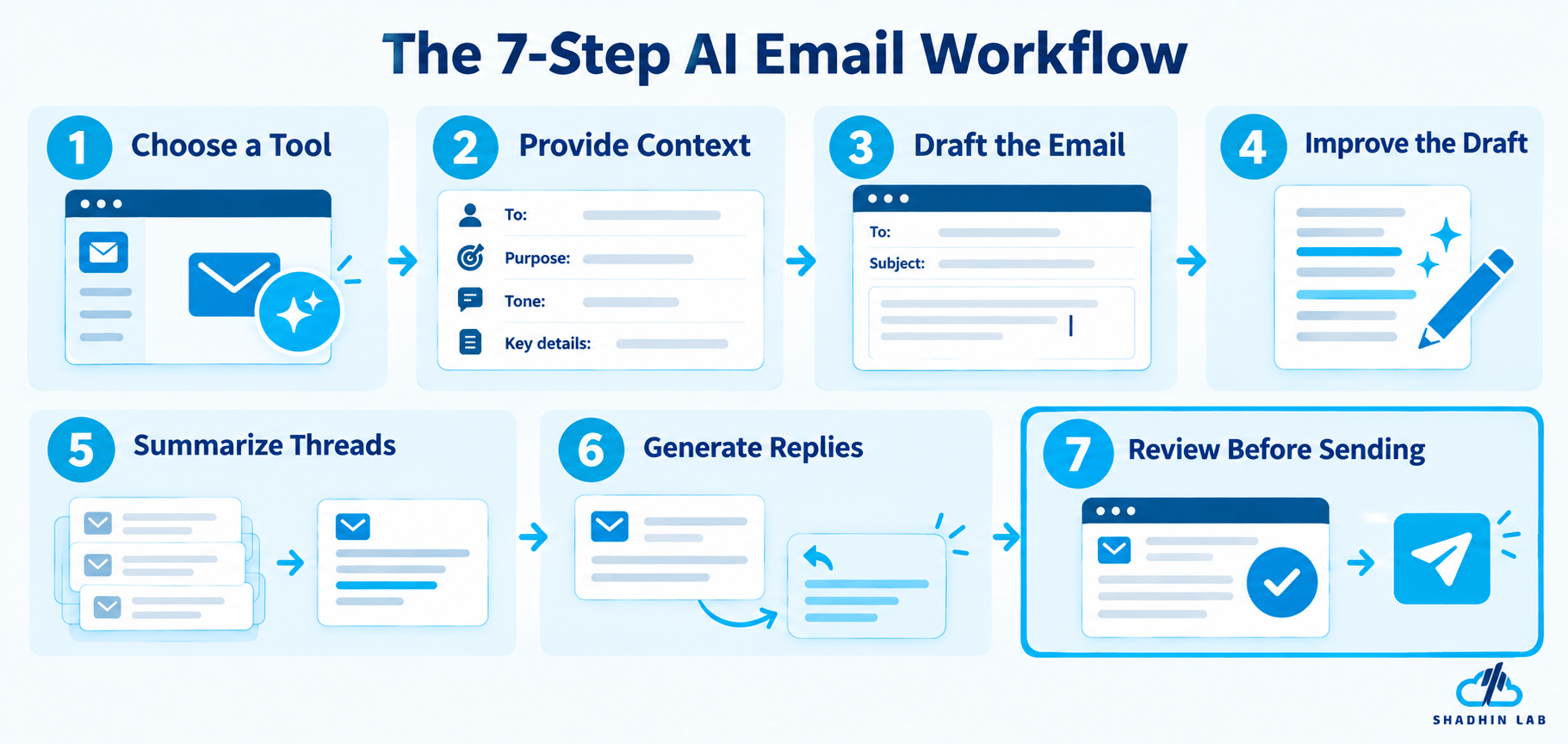
Step 1 — Choose an AI Email Assistant
Start with the email environment you already use.
Some AI capabilities are built directly into email and productivity platforms, while others are available through standalone AI tools or integrations.
For example, Gmail users with eligible access can use Gemini to draft emails, summarize threads, suggest responses, and work with information available through Gmail and connected Google Workspace features.
Microsoft Outlook users with eligible Copilot access can use Copilot to draft emails, adjust tone and length, summarize threads, and improve existing drafts.
You can also use a general-purpose AI assistant alongside your email application. In that case, you provide the relevant email content, ask for help, and move the finished result back into your email client.
When comparing your options, focus on a few important areas.
Integration: Consider whether the AI works directly inside your existing email environment or requires you to move information between applications.
Capabilities: Decide whether you only need writing assistance or also want features such as thread summarization, inbox search, action-item extraction, or workflow automation.
Data access: Understand what email and account information the assistant needs permission to access.
Privacy and organizational requirements: If you are using AI for work, make sure the product and configuration fit your company’s policies.
The best AI email assistant is not necessarily the one with the longest feature list. It is the one that fits your workflow and gives you an appropriate level of control.
Step 2 — Give the AI Enough Context
This is one of the biggest differences between a useful AI-generated email and a generic one.
Instead of simply saying:
Write a follow-up email.
Give the AI enough information to understand the situation.
A practical framework is:
Recipient + purpose + context + tone + constraints + desired action
For example:
Write a polite follow-up to a potential client who has not responded to our proposal. The goal is to ask whether they have reviewed it and offer to answer any questions. Keep it under 120 words. Make it professional and friendly without sounding pushy.
This works because the AI now understands who the message is for, why you are sending it, what has already happened, how it should sound, and what you want the recipient to do.
You do not need to write a complicated prompt. You simply need to provide the information that matters.
Step 3 — Ask AI to Draft the Email
Once the AI has enough context, ask it to create a first draft.
A simple workflow is:
Your notes → AI draft → review → edit → send
Do not worry about making your notes polished before giving them to AI. Turning rough information into structured communication is one of the tasks where an assistant can save time.
Suppose you have just finished a client meeting and your notes look like this:
Client approved the homepage direction. They want two changes to the hero section. We will send the revised version Thursday. Ask them to confirm whether the new CTA wording works.
You could simply ask:
Turn these notes into a concise client follow-up email. Keep the tone professional and friendly.
The AI can organize the information into a readable message while you remain responsible for checking whether the draft accurately reflects what happened.
Think of the first AI-generated version as a working draft, not a finished email.
Step 4 — Improve an Existing Email With AI
You do not always need AI to write an email from scratch.
Often, you already know what you want to say, but the wording does not feel quite right. In those situations, give AI your draft and tell it exactly what you want improved.
For example:
Rewrite this email to sound confident and professional without making it overly formal. Keep the meaning unchanged and make it shorter.
You can also ask for specific improvements such as:
- Make it more concise
- Improve clarity
- Make it friendlier
- Remove repetition
- Fix grammar
- Make the wording more diplomatic
This approach is often better than asking AI to invent the entire email because you provide the ideas and AI helps improve their presentation.
It also reduces the chance of the assistant introducing information or intentions that you never meant to communicate.
Step 5 — Use AI to Summarize Long Email Threads
Long email threads can contain decisions, questions, corrections, deadlines, and requests scattered across many messages.
AI can condense that conversation into something easier to process.
Instead of asking only for a general summary, tell the assistant what information you need:
Summarize this email thread and identify the main decision, unresolved questions, people responsible for next steps, and the latest deadline.
This produces a more useful result than a generic paragraph summarizing the conversation.
Gmail’s Gemini features can summarize email threads and extract action items, while Outlook’s Copilot can summarize conversations and surface key points.
However, a summary should be treated as a starting point rather than a replacement for the original conversation when details matter.
If you are about to act on a deadline, price, commitment, technical requirement, or important decision, check the source email before proceeding.
Step 6 — Generate Better Email Replies
One of the simplest uses of an AI email assistant is preparing replies.
But avoid giving instructions such as:
Reply to this email.
The AI may understand the conversation, but it does not necessarily know what decision you want to communicate.
A better instruction would be:
Reply to this client. Confirm that we can deliver the revised proposal by Friday. Thank them for the feedback. Keep the response concise and professional.
Now the responsibilities are clear.
You decide what should be communicated. AI helps determine how to communicate it clearly.
This distinction becomes increasingly important when emails involve deadlines, commitments, pricing, customer issues, or other business decisions.
Step 7 — Review Before Sending
Never treat an AI-generated email as automatically correct.
AI can misunderstand the source material or introduce incorrect facts, names, dates, assumptions, and commitments. Before sending an important message, perform a quick review.
Names and recipients: Make sure the message addresses the right person and references everyone correctly.
Dates and deadlines: Check any meeting dates, delivery dates, schedules, or promised timelines against the original information.
Numbers and commitments: Verify prices, quantities, percentages, deliverables, and anything that could be interpreted as a promise.
Technical details: Product features, policies, specifications, and other factual information should be checked when accuracy matters.
Tone and wording: AI can make an email grammatically correct while still getting the tone wrong. Read the message from the recipient’s perspective and ask whether it sounds appropriate for the situation.
Pay particular attention to formality and directness. Make sure the AI has not softened the message so much that the main point becomes unclear—or made it more forceful than you intended.
Also remove phrases you would never normally use. AI often adds polite filler, repeated explanations, or overly elaborate wording that can make a simple email feel artificial.
For important emails, reading the draft aloud can be a useful final check. If it sounds unnatural when spoken, it may also feel unnatural to the recipient.
Microsoft’s own Outlook guidance, for example, instructs users to review generated drafts and edit them before sending.
The final email should represent your judgment, not simply whatever the AI generated first.
How to Write Better Prompts for an AI Email Assistant
You do not need advanced prompt-engineering skills to get useful email drafts.
For most situations, a good prompt contains six pieces of information.
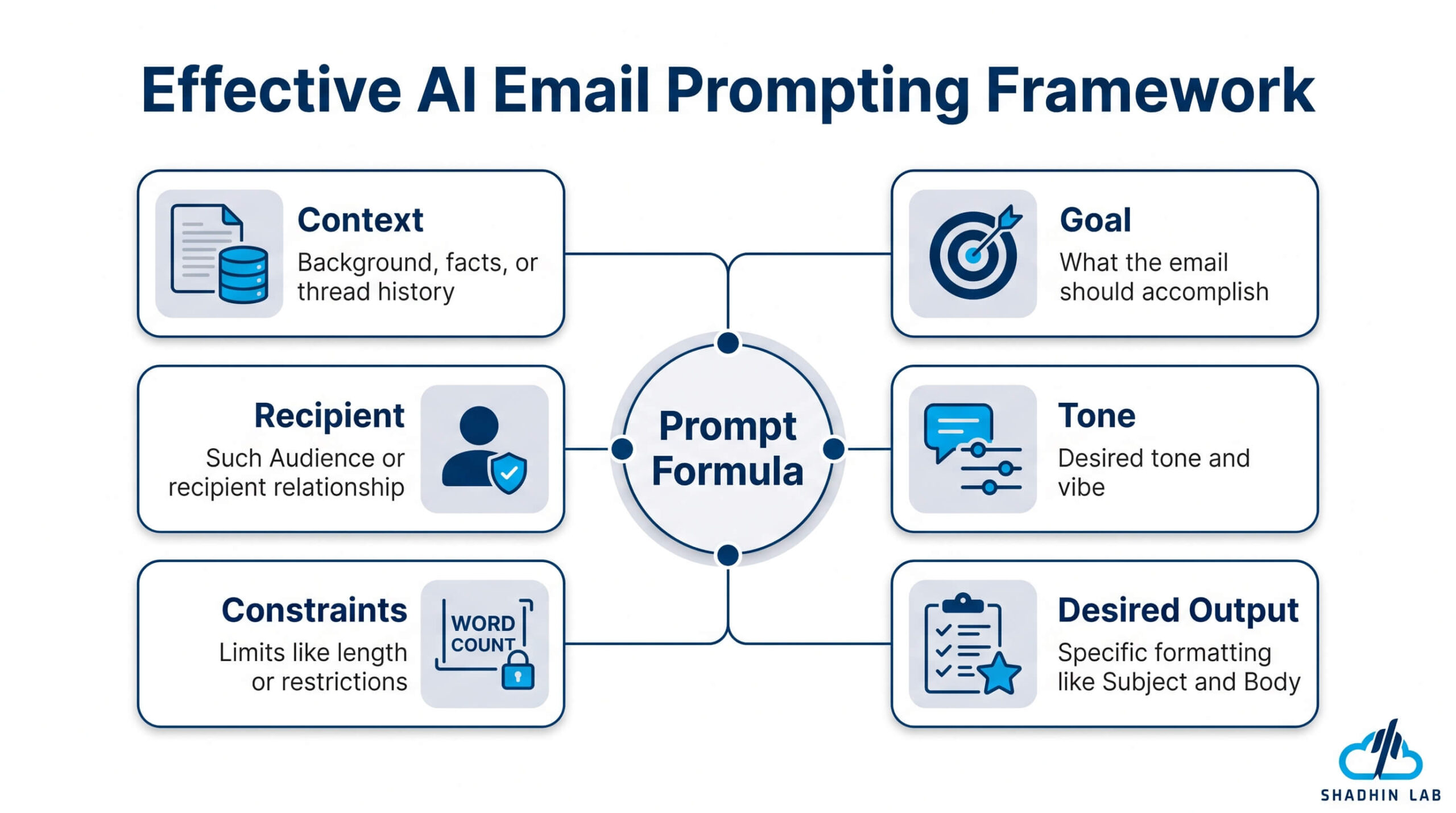
Context
Explain what is happening.
The client has reviewed our proposal and requested a revised timeline.
Goal
Explain what the email should accomplish.
Ask them to confirm whether the revised deadline works.
Recipient
Tell the AI who will receive the message.
The recipient is a long-term client.
Tone
Describe how you want the email to sound.
Professional, warm, and concise.
Constraints
Give the AI useful boundaries.
Keep it below 100 words. Do not sound pushy.
Desired Output
Specify exactly what you want.
Provide a subject line and email body.
Now compare the difference.
Weak prompt:
Write an email to my client.
Better prompt:
Write a concise follow-up email to a client who has not responded to our proposal. The goal is to ask whether they have reviewed it and offer to answer questions. Keep it professional and friendly, under 100 words, without sounding pushy. Include a clear subject line.
The second prompt gives AI a much clearer path to the result you want.
You can remember the structure as:
Context + goal + recipient + tone + constraints + output
Practical AI Email Assistant Use Cases
The most valuable applications of AI email assistants are often everyday communication tasks rather than complex automation.
Writing Professional Emails
Suppose your notes say:
Need to send updated proposal. Added pricing changes. Ask if they have questions.
You already know what needs to be communicated. The time-consuming part is turning those thoughts into a polished message.
AI can take those notes and create a structured email in seconds. You can then verify the details, adjust the tone, and send it.
This is a good example of AI removing writing friction without taking over the actual decision-making.
Following Up With Prospects
Sales and business development teams often need to send repeated follow-ups.
AI can help turn information about a prospect, previous conversation, and intended next step into a personalized draft rather than forcing someone to start every message from a blank screen.
For example, provide the prospect’s previous response and tell AI what should happen next. It can then prepare a short follow-up that reflects that context.
The goal should not be to send hundreds of identical AI-generated messages. Relevant context and personalization still matter, particularly when you are trying to build a relationship.
Rewriting Difficult Messages
Some emails are difficult not because you do not know what happened, but because finding the right wording is uncomfortable.
You might need to explain a delay, reject a request, ask for payment, correct a misunderstanding, or tell someone that a deadline cannot be met.
AI can help you communicate the message more clearly without changing its meaning.
For example:
Rewrite this message to be direct but respectful. Do not make the situation sound less serious, and do not make promises that are not included in my original message.
That last instruction matters.
Good AI use is not simply about making an uncomfortable message sound nicer. It is about improving the communication without changing what you actually mean.
Meeting Follow-Ups
Meeting notes are another natural use case.
You can give AI rough notes and ask it to organize them into decisions, responsibilities, deadlines, and next steps.
For example:
Turn these meeting notes into a client follow-up email. Start with a short thank-you, summarize the decisions, list the agreed next steps, and mention that we will send the revised document on Thursday.
AI handles the initial organization. You confirm that the resulting email accurately represents what everyone agreed to.
Customer Support
AI can help support teams prepare responses to common customer questions, improve existing replies, and turn internal information into clearer customer-facing communication.
The level of AI involvement should depend on the situation.
A straightforward question about a feature may be suitable for AI-assisted drafting. A complaint, refund dispute, security issue, account problem, legal matter, or emotionally difficult conversation may require much more human attention.
The more sensitive the situation becomes, the more important human judgment becomes.
How to Use AI to Manage Your Email Inbox
AI can be useful beyond writing individual messages.
Depending on the product and permissions available, it may help summarize conversations, identify action items, find relevant messages, suggest replies, and surface information from your inbox.
For example, Gemini in Gmail can help users summarize threads, search for relevant emails, identify action items, and draft messages.
Outlook’s Copilot can also summarize email threads and help users work with inbox information through natural-language prompts.
The important question is how much control you want to give the system.
There is a meaningful difference between:
AI suggests → human reviews → action is approved
and:
AI decides → AI acts automatically
For many professional workflows, the first model provides a safer starting point.
As you become comfortable with a particular workflow, you can decide whether additional automation is appropriate. But before enabling automated actions, understand what permissions the AI has and what it is allowed to do without your approval.
How to Use AI Email Assistants Without Losing Your Voice
One of the easiest ways to make AI-generated communication feel artificial is to accept the first draft without changing anything.
AI-generated emails can become generic, overly formal, repetitive, or longer than necessary. If every message sounds like it was written by the same assistant, your communication can lose some of the personality that makes it effective.
A better approach is:
Your ideas → AI structure → human personalization → final review
Give AI your actual thoughts instead of asking it to invent everything.
Once you receive the draft, personalize it.
Use your normal vocabulary. Replace phrases that sound polished but unlike anything you would naturally say.
Adjust the level of formality. An email to a colleague you work with every day should probably not sound like a legal letter.
Add relationship-specific context. A short reference to a previous conversation, meeting, or shared understanding can make a message feel much more personal.
Remove unnecessary filler. AI often adds sentences such as lengthy introductions, repeated thanks, or elaborate transitions that the email does not need.
This matters particularly for client, leadership, partnership, sales, and other relationship-based communication.
The goal is not to make your emails sound like AI.
The goal is to make your communication easier to produce without losing your voice.
Common Mistakes When Using AI for Email
Knowing what AI can do is useful. Knowing where people commonly misuse it is just as important.
Giving Too Little Context
A vague instruction such as:
Write a professional email.
does not tell the AI what happened, who the recipient is, what you want, or what the email should accomplish.
The assistant then has to fill in the gaps, which usually produces generic writing.
Give it the relevant context instead.
Sending AI Output Without Reviewing It
An AI-generated email can sound completely confident while containing a detail you never provided.
Treat the output as a draft. Verify important facts and make sure the message communicates what you actually intend before sending it.
Overusing Formal Language
Professional does not mean complicated.
AI assistants sometimes default to polished but unnecessarily formal wording. That can make a simple email feel distant or artificial.
If a straightforward sentence communicates the point clearly, use the straightforward sentence.
Sharing Sensitive Information Unnecessarily
Think carefully about what you provide to an AI system.
Customer information, private documents, financial data, passwords, legal material, and other confidential information should not be shared simply because it makes prompting more convenient.
Provide only the information necessary for the task and follow your organization’s policies.
Automating Every Reply
Not every email benefits from automation.
Some conversations require empathy, negotiation, personal attention, accountability, or an understanding of a relationship that goes beyond the information contained in a thread.
The fact that a response can be automated does not mean it should be.
Asking AI to Make Unsupported Claims
This is especially risky in sales, finance, healthcare, legal, and customer-facing communication.
If the AI does not have verified information, it should not invent an answer simply because the email requires one.
Provide verified information or confirm the facts yourself before communicating them.
AI Email Assistant Privacy and Security
Email contains some of the most sensitive information in a business. That makes privacy an important part of choosing and using an AI email assistant.
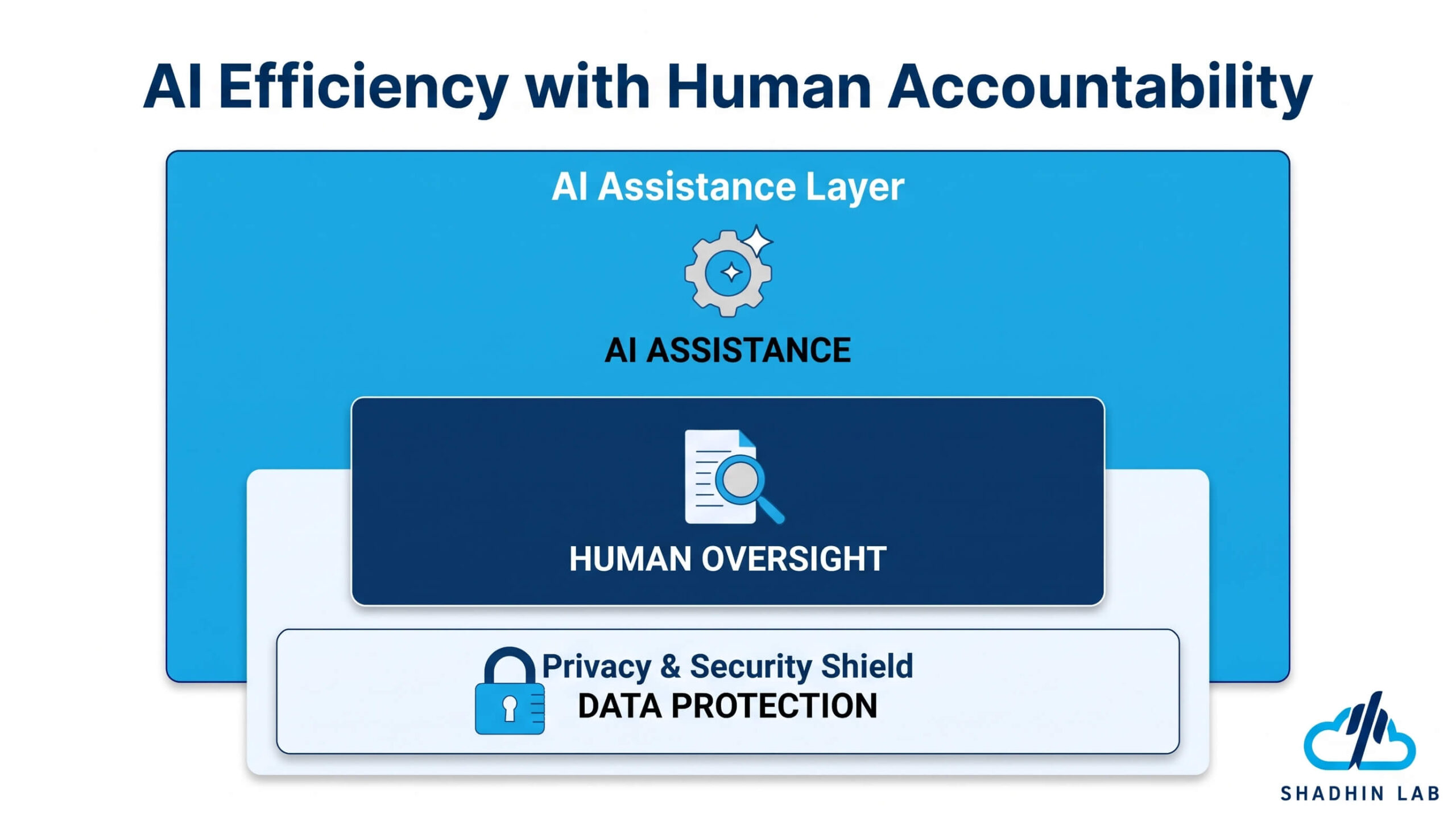
Before connecting an AI system to your inbox, understand what information it can access and what permissions you are granting.
There are several areas worth checking.
Access: What email, account, attachment, contact, or connected-app information can the AI access?
Data handling: How is your information processed under the specific product and plan you are using? Do not assume that every version of an AI product follows exactly the same data practices.
Retention and controls: Look at available data-retention settings and organizational or administrator controls.
Connected services: Understand which third-party systems are connected and what information can move between them.
Action permissions: Determine whether the assistant can only suggest actions or can perform them automatically.
Internal policies: For business use, your organization’s security and AI policies should be part of the decision.
Avoid blanket assumptions that an AI provider either “stores everything” or “keeps everything completely private.” The actual terms can depend on the product, account type, configuration, and applicable policies.
For professional use, review the provider’s current documentation and your organization’s requirements before connecting sensitive mailboxes or customer data.
How to Build an Effective AI Email Workflow
Once you understand the individual techniques, combine them into a repeatable process.
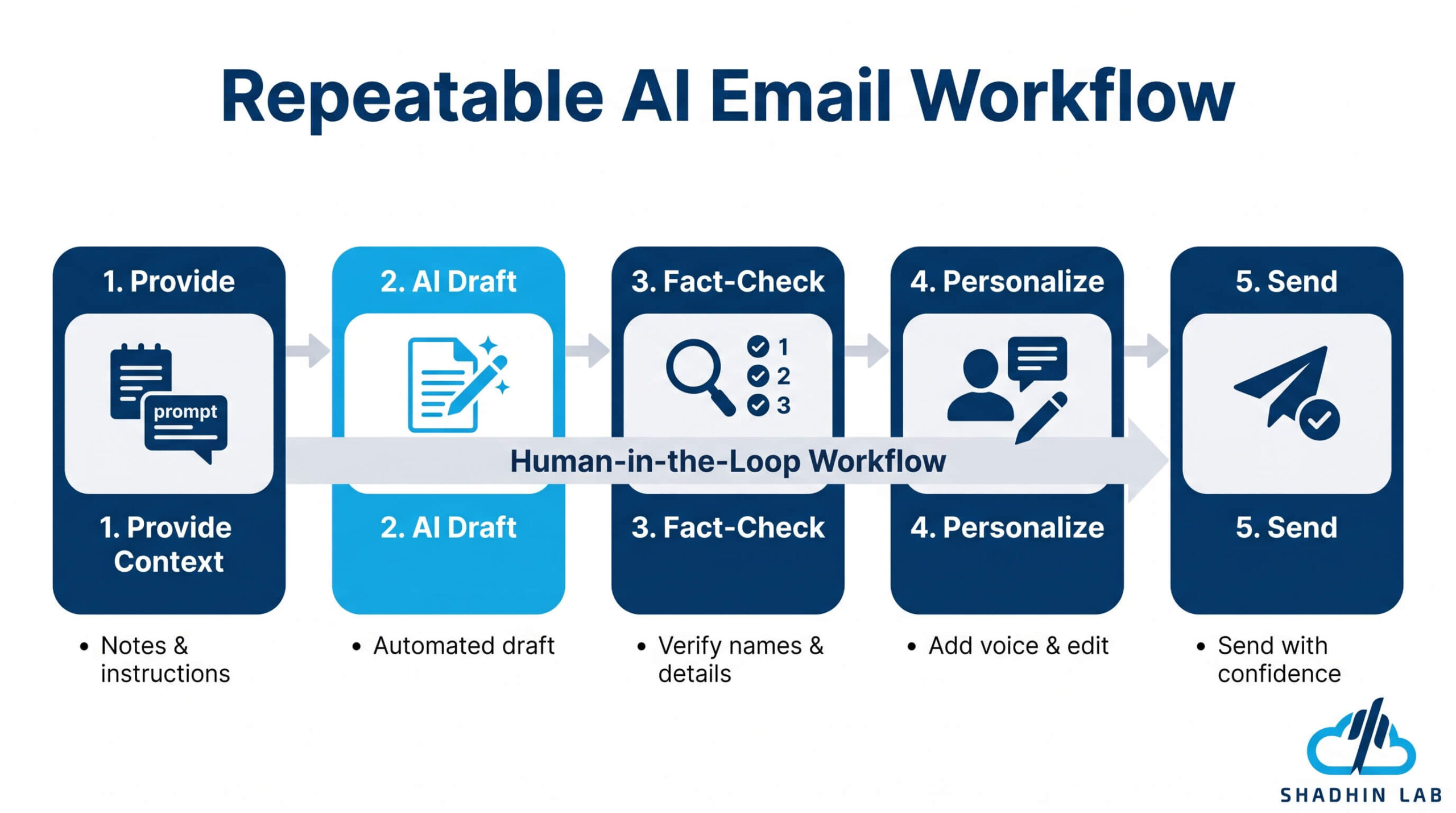
1. Identify the Task
First decide what you actually need from AI. Are you drafting a new message, rewriting something, summarizing a conversation, extracting information, or preparing a reply?
2. Provide the Relevant Context
Give the assistant the information it needs to understand the situation. Avoid dumping unnecessary information into the prompt.
3. Give Clear Instructions
Explain the goal, recipient, tone, constraints, and desired output.
4. Generate or Improve the Draft
Let AI produce a first version. Treat it as working material rather than a finished message.
5. Fact-Check
Verify names, dates, numbers, commitments, deadlines, and any other information that matters.
6. Personalize
Adjust the wording so the message reflects your voice, relationship with the recipient, and actual intention.
7. Send
Only send the email when you are comfortable taking responsibility for its content.
The complete workflow is:
Identify → provide context → instruct → generate → verify → personalize → send
This is a simple change in process, but it changes the role AI plays.
Instead of randomly asking an assistant to “write an email,” you are using AI as one part of a repeatable communication workflow.
When Should You Not Use an AI Email Assistant?
AI assistance is not appropriate for every email.
The more an email depends on judgment, accountability, sensitivity, or personal understanding, the more careful you should be about outsourcing its creation to AI.
For example, consider limiting AI’s role when a message involves a serious conflict, creates a legal or financial commitment, contains highly sensitive information, requires nuanced negotiation, or depends heavily on empathy.
The same applies when the recipient expects genuinely personal communication and an AI-generated response could feel inappropriate or detached.
That does not always mean AI has no role at all.
You might still use it to check grammar, organize your thoughts, identify unclear sentences, or make a draft more concise. But the substance of the communication should remain firmly under human control.
A useful principle is:
AI can help prepare the communication, but it should not always be the decision-maker.
FAQ
Can AI Reply to Emails Automatically?
Some AI-powered email systems can assist with replies and, depending on the product and configuration, support more automated workflows.
Automatic sending should be used carefully, particularly for important, sensitive, customer-facing, or relationship-based communication.
Can AI Summarize Email Threads?
Yes. AI email features can summarize long conversations and identify key points or action items. For example, Gemini in Gmail and Copilot in Outlook both provide email-thread summarization features.
When an important decision, deadline, number, or commitment is involved, verify the summary against the original conversation.
Can AI Manage My Inbox?
AI can assist with tasks such as finding relevant messages, summarizing conversations, identifying action items, and suggesting responses.
The exact capabilities depend on the email platform, AI product, account, integrations, and permissions available.
Is It Safe to Use AI for Emails?
It can be appropriate, but safety depends on the product, configuration, information involved, and your organization’s policies.
Be particularly careful with confidential, personal, financial, legal, customer, or otherwise sensitive information.
Can AI Write Professional Emails?
Yes. AI can help structure and polish professional emails, turn notes into drafts, improve tone, and make messages clearer.
However, the person responsible for sending an important email should still review its content.
Can an AI Email Assistant Replace a Human?
For repetitive writing and information-processing tasks, AI can significantly reduce manual work.
But email is not only a writing task. It often involves decisions, relationships, accountability, negotiation, and context.
Those are areas where human judgment remains important.
Conclusion
AI email assistants are most useful when they reduce the repetitive work around email without replacing human judgment. Use AI to draft, summarize, rewrite, and organize information—but review important messages before they leave your inbox.
A simple approach is:
Give AI context → generate → review → personalize → send.
For businesses looking to go beyond individual emails, ShadhinLab can help build AI-powered workflows that connect email with CRM systems, internal tools, customer data, and existing business processes.

Shaif Azad
Shaif Azad Rahi is an AI/ML professional and Solution Engineer at Shadhin Lab, specializing in AI-powered solutions and scalable software systems, with a focus on applying AI to solve real-world business challenges.
Related Post
AI Risk Management: Frameworks, Challenges & Best Practices
Are you someone who lies awake wondering if your AI systems might suddenly make catastrophic decisions?...
AI Infrastructure for LLMs: Components, Costs, and Deployment
Large language models (LLMs) need more than a powerful GPU to operate reliably in production. They...
Prompt Engineering Guide: How to Write Better AI Prompts
You ask an AI model a simple question and get a generic answer. You rewrite the...
